Enforce VPC Rules for Amazon Comprehend Jobs and CMK Encryption for Custom Models
Co-authored with Shanthan Kesharaju
You can now control the Amazon Virtual Private Cloud (Amazon VPC) and encryption settings for your Amazon Comprehend APIs using AWS Identity and Access Management (IAM) condition keys, and encrypt your Amazon Comprehend custom models using customer managed keys (CMK) via AWS Key Management Service (AWS KMS).
IAM condition keys enable you to further refine the conditions under which an IAM policy statement applies. You can use the new condition keys in IAM policies when granting permissions to create asynchronous jobs and creating custom classification or custom entity training jobs.
Amazon Comprehend now supports five new condition keys:
comprehend:VolumeKmsKeycomprehend:OutputKmsKeycomprehend:ModelKmsKeycomprehend:VpcSecurityGroupIdscomprehend:VpcSubnets
The keys allow you to ensure that users can only create jobs that meet your organization’s security posture, such as jobs that are connected to the allowed VPC subnets and security groups. You can also use these keys to enforce encryption settings for the storage volumes where the data is pulled down for computation and on the Amazon S3 bucket where the output of the operation is stored. If users try to use an API with VPC settings or encryption parameters that aren’t allowed, Amazon Comprehend rejects the operation synchronously with a 403 Access Denied exception.
Solution Overview
We want to enforce a policy to do the following:
- Make sure that all custom classification training jobs are specified with VPC settings
- Have encryption enabled for the classifier training job, the classifier output, and the Amazon Comprehend model
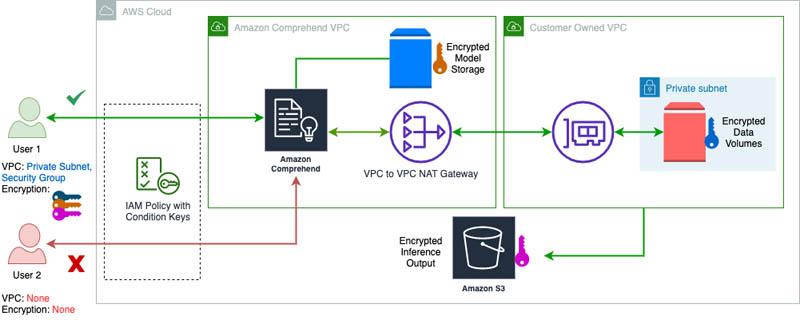
This way, when someone starts a custom classification training job, the training data that is pulled in from Amazon S3 is copied to the storage volumes in your specified VPC subnets and is encrypted with the specified VolumeKmsKey. The solution also makes sure that the results of the model training are encrypted with the specified OutputKmsKey. Finally, the Amazon Comprehend model itself is encrypted with the AWS KMS key specified by the user when it’s stored within the VPC.
The solution uses three different keys for the data, output, and the model, respectively, but you can choose to use the same key for all three tasks. Additionally, this new functionality enables you to audit model usage in AWS CloudTrail by tracking the model encryption key usage.
Encryption with IAM Policies
The following policy makes sure that users must specify VPC subnets and security groups for VPC settings and AWS KMS keys for both the classifier and output:
{
  "Version": "2012-10-17",
  "Statement": [{
    "Action": ["comprehend:CreateDocumentClassifier"],
    "Effect": "Allow",
    "Resource": "*",
    "Condition": {
      "Null": {
        "comprehend:VolumeKmsKey": "false",
        "comprehend:OutputKmsKey": "false",
        "comprehend:ModelKmsKey": "false",
        "comprehend:VpcSecurityGroupIds": "false",
        "comprehend:VpcSubnets": "false"
      }
    }
  }]
}
For example, User 1 provides both the VPC settings and the encryption keys, and can successfully complete the operation:
aws comprehend create-document-classifier \
  --region region \
  --document-classifier-name testModel \
  --language-code en \
  --input-data-config S3Uri=s3://S3Bucket/docclass/filename \
  --data-access-role-arn arn:aws:iam::[account]:role/testDataAccessRole \
  --volume-kms-key-id arn:aws:kms:region:[account]:alias/ExampleAlias \
  --output-data-config S3Uri=s3://S3Bucket/output/filename,KmsKeyId=arn:aws:kms:region:[account]:alias/ExampleAlias \
  --vpc-config SecurityGroupIds=sg-11a111111a1example,Subnets=subnet-11aaa111111example
User 2, on the other hand, doesn’t provide any of these required settings and isn’t allowed to complete the operation — resulting in a 403 Access Denied exception.
We can also enforce an even stricter policy, in which we have to set the VPC and encryption settings to include specific subnets, security groups, and KMS keys. This policy applies these rules for all Amazon Comprehend APIs that start new asynchronous jobs, create custom classifiers, and create custom entity recognizers:
{
  "Version": "2012-10-17",
  "Statement": [{
    "Action": [
      "comprehend:CreateDocumentClassifier",
      "comprehend:CreateEntityRecognizer",
      "comprehend:Start*Job"
    ],
    "Effect": "Allow",
    "Resource": "*",
    "Condition": {
      "ArnEquals": {
        "comprehend:VolumeKmsKey": "arn:aws:kms:region:[account]:key/key_id",
        "comprehend:ModelKmsKey": "arn:aws:kms:region:[account]:key/key_id1",
        "comprehend:OutputKmsKey": "arn:aws:kms:region:[account]:key/key_id2"
      },
      "ForAllValues:StringLike": {
        "comprehend:VpcSecurityGroupIds": ["sg-11a111111a1example"],
        "comprehend:VpcSubnets": ["subnet-11aaa111111example"]
      }
    }
  }]
}
Model Encryption with a CMK
Along with encrypting your training data, you can now encrypt your custom models in Amazon Comprehend using a CMK.
You need to add an IAM policy to allow a principal to use or manage CMKs. When writing your policy statements, it’s a best practice to limit CMKs to those that the principals need to use, rather than give the principals access to all CMKs.
When you use AWS KMS encryption, kms:CreateGrant and kms:RetireGrant permissions are required for model encryption. The following IAM policy allows the principal to call the create operations only on the specified CMKs:
{
  "Version": "2012-10-17",
  "Statement": {
    "Effect": "Allow",
    "Action": [
      "kms:CreateGrant",
      "kms:RetireGrant",
      "kms:GenerateDataKey",
      "kms:Decrypt"
    ],
    "Resource": [
      "arn:aws:kms:us-west-2:[account]:key/1234abcd-12ab-34cd-56ef-1234567890ab"
    ]
  }
}
Enable Model Encryption
Custom model encryption is available via the AWS CLI. The following example creates a custom classifier with model encryption:
aws comprehend create-document-classifier \
  --document-classifier-name my-document-classifier \
  --data-access-role-arn arn:aws:iam::[account]:role/mydataaccessrole \
  --language-code en --region us-west-2 \
  --model-kms-key-id arn:aws:kms:us-west-2:[account]:key/[key-id] \
  --input-data-config S3Uri=s3://path-to-data/multiclass_train.csv
You can also train a custom entity recognizer with model encryption:
aws comprehend create-entity-recognizer \
  --recognizer-name my-entity-recognizer \
  --data-access-role-arn arn:aws:iam::[account]:role/mydataaccessrole \
  --language-code "en" --region us-west-2 \
  --input-data-config '{
    "EntityTypes": [{"Type": "PERSON"}, {"Type": "LOCATION"}],
    "Documents": {"S3Uri": "s3://path-to-data/documents"},
    "Annotations": {"S3Uri": "s3://path-to-data/annotations"}
  }'
And create an endpoint for your custom model with encryption enabled:
aws comprehend create-endpoint \
  --endpoint-name myendpoint \
  --model-arn arn:aws:comprehend:us-west-2:[account]:document-classifier/my-document-classifier \
  --data-access-role-arn arn:aws:iam::[account]:role/mydataaccessrole \
  --desired-inference-units 1 --region us-west-2
Conclusion
You can now enforce security settings like enabling encryption and VPC settings for your Amazon Comprehend jobs using IAM condition keys. The IAM condition keys are available in all AWS Regions where Amazon Comprehend is available. You can also encrypt the Amazon Comprehend custom models using customer managed keys.